



The Future of Online Shopping is Immersive
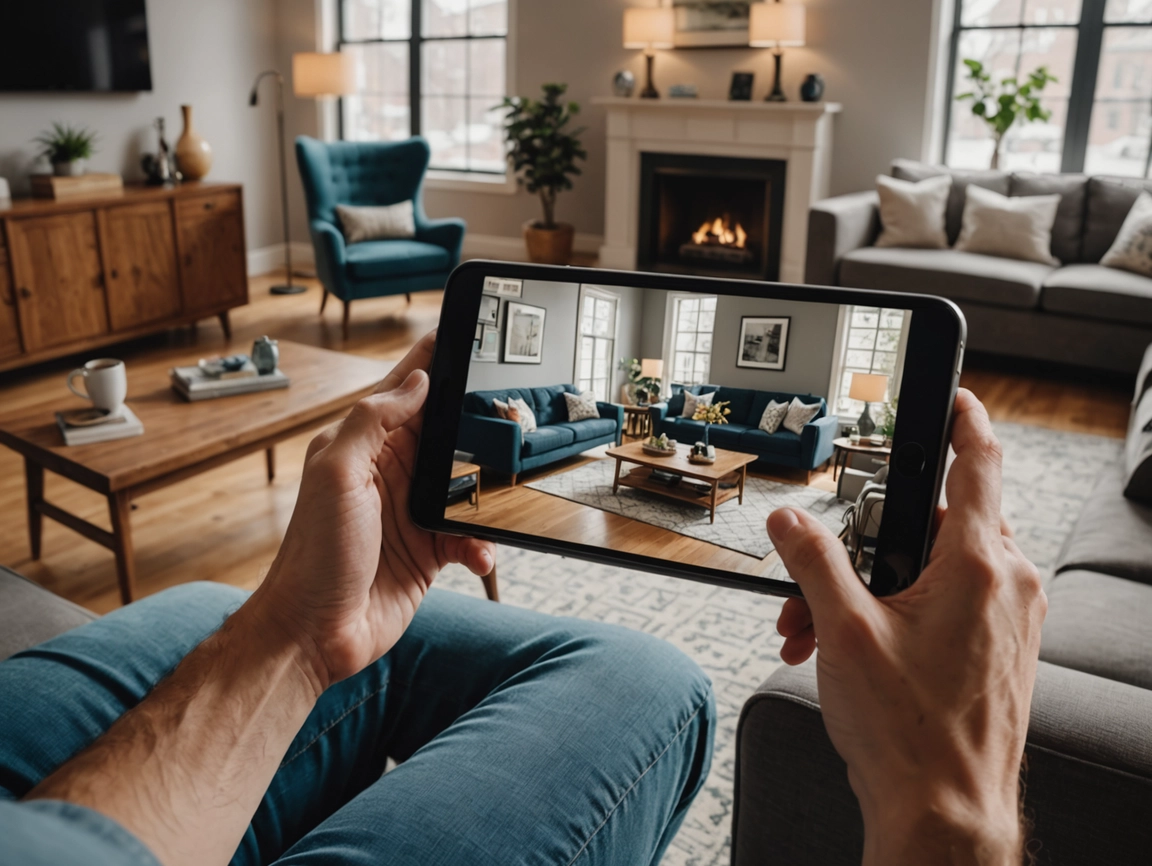
Augmented Reality (AR) is transforming ecommerce by enabling customers to visualise products in their own space before purchasing—see furniture in your living room, try on glasses virtually, preview paint colours on your walls, or place appliances in your kitchen. This immersive technology addresses ecommerce’s fundamental limitation: inability to touch, try, or see products in context before buying. AR reduces returns by 25-40% (customers know what they’re getting), increases conversion rates by 40-200% (confidence to purchase), and creates engaging experiences that differentiate brands. Major platforms including Shopify, WooCommerce, and BigCommerce now support AR, while tools like Google Model Viewer, Apple AR Quick Look, and specialised apps make implementation accessible to businesses of all sizes. From 3D product models and virtual try-on to room visualisation and interactive experiences, AR is no longer futuristic—it’s practical technology delivering measurable ROI today. Let’s explore how to implement AR for product visualisation and capture competitive advantage.

Why AR Matters for Ecommerce
Reduces returns: 25-40% reduction in return rates when customers use AR to visualise products—seeing item in their space sets accurate expectations preventing “not what I expected” returns saving thousands in return costs.
Increases conversion: 40-200% higher conversion rates for products with AR versus without—confidence from visualisation overcomes purchase hesitation, particularly for high-consideration items like furniture or home decor.
Improves engagement: Customers spend 2-3x longer on product pages with AR, share AR experiences on social media creating organic marketing, and remember brands offering AR creating differentiation.
Competitive advantage: Only 1-2% of ecommerce sites currently use AR—early adopters gain significant advantage before it becomes table stakes like product reviews or free shipping.
Customer expectations: 61% of consumers prefer retailers offering AR experiences, 71% would shop more frequently with AR, and younger demographics (Gen Z, Millennials) expect immersive digital experiences—meeting expectations becomes competitive necessity.
AR Use Cases by Category
Furniture and home decor: Visualise sofas, tables, lamps, blinds and curtains or artwork in actual room seeing size, style, and fit—IKEA Place, Wayfair View in Room, and Amazon AR View pioneered this application with massive success.
Fashion and accessories: Virtual try-on for glasses, watches, jewelry, or makeup—Warby Parker, Ray-Ban, and Sephora use AR enabling customers to see how items look on them without visiting store.
Home improvement: Preview paint colours on walls, visualise flooring, see tile patterns, blinds and curtains or place fixtures—Sherwin-Williams ColorSnap, Lowe’s View in Your Space help customers make confident decisions.
Appliances and electronics: See refrigerators, TVs, or speakers in kitchen or living room ensuring size and style fit—Best Buy and Home Depot offer AR for major appliances.
Outdoor and garden: Visualise grills, patio furniture, planters, or outdoor decor in yard or deck—helps customers plan outdoor spaces.
Art and wall decor: See artwork, mirrors, or wall hangings on your actual walls at proper scale—eliminates guessing about size and placement.
AR Technologies and Standards
WebAR: AR experiences running in web browser without app download—accessible via link, works on iOS and Android, lower barrier than app-based AR, and supported by Google Model Viewer and Apple AR Quick Look.
Apple AR Quick Look: Native iOS AR using .usdz 3D model format—seamless integration with Safari and iOS, high-quality rendering, and works on iPhone 6S and newer with iOS 12+.
Google Model Viewer: Web component for 3D models supporting AR on Android (Scene Viewer) and iOS (AR Quick Look)—cross-platform solution using .glb or .gltf model formats.
8th Wall: WebAR platform enabling advanced AR experiences in browser—$99-$499/month for custom AR beyond basic product visualisation.
App-based AR: Dedicated apps with AR features (IKEA Place, Wayfair app)—higher quality experiences but requires app download creating friction.
Implementation on Ecommerce Platforms
Shopify AR
Native support: Shopify supports 3D models and AR on product pages—upload .glb models, customers view in AR on iOS (AR Quick Look) and Android (Scene Viewer).
Setup process: Create 3D models of products (.glb format), upload to Shopify product media, enable 3D model viewer in theme, and customers see “View in your space” button on mobile devices.
Apps: Shopify AR (free, basic 3D/AR), Threekit ($500-$5,000+/month for advanced configurators), or Zakeke ($59-$299/month for customisation and AR).
Best for: Furniture, home decor, appliances, or any products where size and placement matter—works out of box with compatible themes.
WooCommerce AR
Plugins: WP 3D Thingviewer ($29 one-time), Model Viewer for WooCommerce (free), or custom implementation using Google Model Viewer web component.
Setup: Install plugin, upload 3D models (.glb or .usdz), configure viewer settings, and add to product pages—more technical than Shopify but flexible.
Considerations: Requires theme compatibility, may need developer for custom integration, and less plug-and-play than Shopify.
BigCommerce AR
Implementation: Custom integration using Google Model Viewer or third-party apps—less native support than Shopify requiring more development.
Apps: Threekit integration or custom development—growing ecosystem but behind Shopify in AR support.
Creating 3D Models
3D scanning: Photograph product from multiple angles, software creates 3D model—services like Capture (by Standard Cognition), Heges, or Marxent scan and create models for $50-$500 per product.
3D modeling services: Professional 3D artists create models from photos and specifications—Fiverr ($50-$300 per model), Upwork ($200-$1,000 per model), or specialized agencies ($500-$5,000 per model for complex items).
DIY 3D modeling: Blender (free, steep learning curve), SketchUp ($119-$299/year, easier), or Tinkercad (free, simple)—requires time investment learning software.
Manufacturer models: Some suppliers provide 3D models—ask manufacturers if models available saving creation costs.
Model requirements: .glb or .gltf format for Google Model Viewer, .usdz format for Apple AR Quick Look (can convert from .glb), optimized file size (under 10MB for web performance), and realistic textures and materials.
Cost considerations: Initial investment $50-$500 per product for professional models, but one-time cost used indefinitely—prioritize bestsellers and high-consideration items first.
Virtual Try-On
What it is: AR overlaying products on customer’s face or body in real-time using camera—glasses, makeup, jewelry, watches, or hats.
Technologies: Face tracking (glasses, makeup), hand tracking (watches, rings), or body tracking (clothing)—requires specialized AR platforms.
Platforms: Banuba ($99-$999/month virtual try-on), Perfect Corp ($custom pricing beauty AR), Vertebrae ($custom pricing 3D/AR platform), or Snapchat Lens Studio (free, create AR lenses).
Examples: Warby Parker virtual glasses try-on, Sephora Virtual Artist makeup try-on, Ray-Ban virtual try-on—proven to increase conversion and reduce returns.
Implementation complexity: More complex than room visualisation requiring face/body tracking—typically requires specialised platform or significant development.
Measuring AR Impact
Engagement metrics: AR interaction rate (percentage of visitors using AR), time spent with AR experience, and social shares of AR experiences—indicates customer interest and engagement.
Conversion metrics: Conversion rate for products with AR versus without, average order value for AR users versus non-users, and cart abandonment rate comparison—quantifies revenue impact.
Return metrics: Return rate for products purchased after AR use versus without, return reasons (“not as expected” should decrease), and cost savings from reduced returns—ROI justification.
Customer feedback: Surveys asking about AR experience, NPS for AR users versus non-users, and qualitative feedback about helpfulness—guides improvements.
A/B testing: Test AR on subset of products measuring impact before full rollout—validates investment and identifies best use cases.
Best Practices
Mobile-first: AR primarily mobile experience—ensure mobile product pages optimised, AR button prominent and clear, and loading times fast (optimise 3D model file sizes).
Clear instructions: Many customers unfamiliar with AR—provide simple instructions (“Tap to view in your space”), show example video or GIF, and explain benefits (“See how it looks in your room”).
Fallback for desktop: Desktop users can’t use AR—provide 360° product viewer, multiple product images, or video as alternative ensuring good experience for all.
Accurate scale: AR value is accurate size representation—ensure 3D models dimensionally accurate, test AR placement in real spaces, and verify scale matches actual product.
Quality models: Low-quality 3D models hurt more than help—invest in realistic textures, accurate colours, and proper lighting making AR experience trustworthy.
Start small: Don’t AR-enable entire catalogue immediately—start with bestsellers or high-return products, measure impact, and expand based on results.
Marketing AR Features
Product page prominence: Clear “View in AR” or “See in your space” button above fold, use icon indicating AR capability, and show preview of AR experience.
Homepage feature: Highlight AR capability on homepage (“Now with AR – see products in your space!”), create dedicated AR landing page, and showcase AR in hero banner.
Social media: Share AR experiences on Instagram, TikTok, Facebook, create AR filters or lenses customers can use and share, and encourage user-generated AR content.
Email marketing: Announce AR features to email list, include AR demos in product emails, and highlight AR in abandoned cart recovery (“Not sure? Try AR to see it in your space”).
Paid advertising: Feature AR in product ads, create video ads showing AR in action, and target high-consideration products where AR adds most value.
Common Mistakes
Poor quality models: Low-resolution or inaccurate 3D models damage credibility—invest in quality models or don’t use AR.
Slow loading: Large 3D model files create poor mobile experience—optimize file sizes (under 10MB) for fast loading.
No mobile optimization: AR is mobile feature but product pages not mobile-optimized—ensure entire mobile experience excellent.
Unclear value: Not explaining why AR useful or how to use it—educate customers on benefits and usage.
Wrong products: AR-enabling products where visualization doesn’t matter (commodity items, small accessories)—focus on high-consideration items where seeing in space matters.
Ignoring metrics: Implementing AR without measuring impact—track engagement, conversion, and returns to validate ROI.
The Bottom Line
Augmented Reality transforms ecommerce enabling customers to visualise products in their space before purchasing reducing returns 25-40% (accurate expectations preventing “not what I expected” returns), increasing conversion 40-200% (confidence from visualisation overcoming hesitation), improving engagement (2-3x longer on product pages, social sharing), and creating competitive advantage (only 1-2% of sites currently use AR) meeting customer expectations (61% prefer retailers offering AR, 71% would shop more frequently with AR). Implement for furniture and home decor (IKEA Place, Wayfair View in Room visualising sofas, tables, lamps in actual rooms), fashion accessories (Warby Parker, Ray-Ban virtual try-on for glasses, watches, jewelry), home improvement (Sherwin-Williams ColorSnap, Lowe’s View in Your Space previewing paint, flooring, fixtures), appliances and electronics (Best Buy, Home Depot AR for refrigerators, TVs ensuring size and style fit), or art and wall decor (seeing artwork, mirrors at proper scale on actual walls).
Use WebAR technologies including Apple AR Quick Look (native iOS using .usdz models, seamless Safari integration, iPhone 6S+ with iOS 12+), Google Model Viewer (cross-platform web component supporting .glb/.gltf models, AR on Android Scene Viewer and iOS AR Quick Look), or 8th Wall ($99-$499/month for advanced custom WebAR experiences) implementing on Shopify (native 3D/AR support uploading .glb models, “View in your space” button on mobile, apps like Shopify AR free, Threekit $500-$5,000+/month, Zakeke $59-$299/month), WooCommerce (WP 3D Thingviewer $29, Model Viewer for WooCommerce free, or custom Google Model Viewer integration), or BigCommerce (custom integration, Threekit, or development required).
Create 3D models through scanning services (Capture, Heges, Marxent $50-$500 per product), professional 3D modeling (Fiverr $50-$300, Upwork $200-$1,000, agencies $500-$5,000 for complex items), DIY modeling (Blender free but steep learning curve, SketchUp $119-$299/year easier, Tinkercad free simple), or manufacturer-provided models asking suppliers, ensuring .glb/.gltf format for Google Model Viewer, .usdz for Apple AR Quick Look, optimised file sizes under 10MB, and realistic textures—one-time cost $50-$500 per product used indefinitely prioritising bestsellers and high-consideration items first.
Implement virtual try-on for glasses, makeup, jewelry, watches using face tracking, hand tracking, or body tracking through platforms like Banuba ($99-$999/month), Perfect Corp (custom pricing beauty AR), Vertebrae (custom pricing 3D/AR), or Snapchat Lens Studio (free AR lenses) following Warby Parker, Sephora Virtual Artist, Ray-Ban examples proven to increase conversion and reduce returns despite higher complexity than room visualisation. Measure impact tracking AR interaction rate, time spent with AR, social shares, conversion rate AR versus non-AR, average order value comparison, cart abandonment rates, return rate reduction, cost savings from reduced returns, customer surveys, NPS scores, and A/B testing validating investment before full rollout.
Follow best practices ensuring mobile-first optimisation (AR primarily mobile with prominent clear buttons, fast loading optimised file sizes), clear instructions (many unfamiliar with AR needing simple guidance, example videos, benefit explanations), desktop fallback (360° viewers, multiple images, video for non-AR users), accurate scale (dimensionally accurate models tested in real spaces), quality models (realistic textures, accurate colours, proper lighting building trust), and starting small (bestsellers or high-return products first, measure impact, expand based on results). Market AR featuring prominently on product pages (“View in AR” button above fold), homepage highlights (“Now with AR!”), dedicated landing pages, social media (Instagram, TikTok, Facebook AR filters encouraging user-generated content), email announcements and abandoned cart recovery (“Not sure? Try AR”), and paid advertising showing AR in action.
Avoid common mistakes including poor quality models damaging credibility (invest in quality or don’t use AR), slow loading from large files (optimise under 10MB), no mobile optimisation (AR is mobile feature requiring excellent mobile experience), unclear value (educate on benefits and usage), wrong products (focus on high-consideration items where visualisation matters not commodity items), and ignoring metrics (track engagement, conversion, returns validating ROI)—Augmented Reality is no longer futuristic but practical technology delivering measurable ROI today through immersive experiences addressing ecommerce’s fundamental limitation of inability to touch, try, or see products in context before buying, creating competitive advantage for early adopters before AR becomes table stakes expectation like product reviews or free shipping.
Affiliate Disclosure: This article contains affiliate links to AR platforms and 3D modeling services. If you purchase through these links, we may earn a commission at no additional cost to you. We only recommend solutions we genuinely believe will help you implement effective AR product visualisation.












